ElasticSearchSearchAPI
Search API 概览
主要包含两部分:
- URL Search
在 URL 中使用查询参数
- Request Body Search
使用 Elasticsearch 提供的,基于 JSON 格式的更加完备的QueryDomainSpecificLanguage(DSL)
指定查询的索引
/_search:集群上所有的索引/index1/_search:index1/index1,index2/_search:index1和index2/index*/_search:以index开头的索引
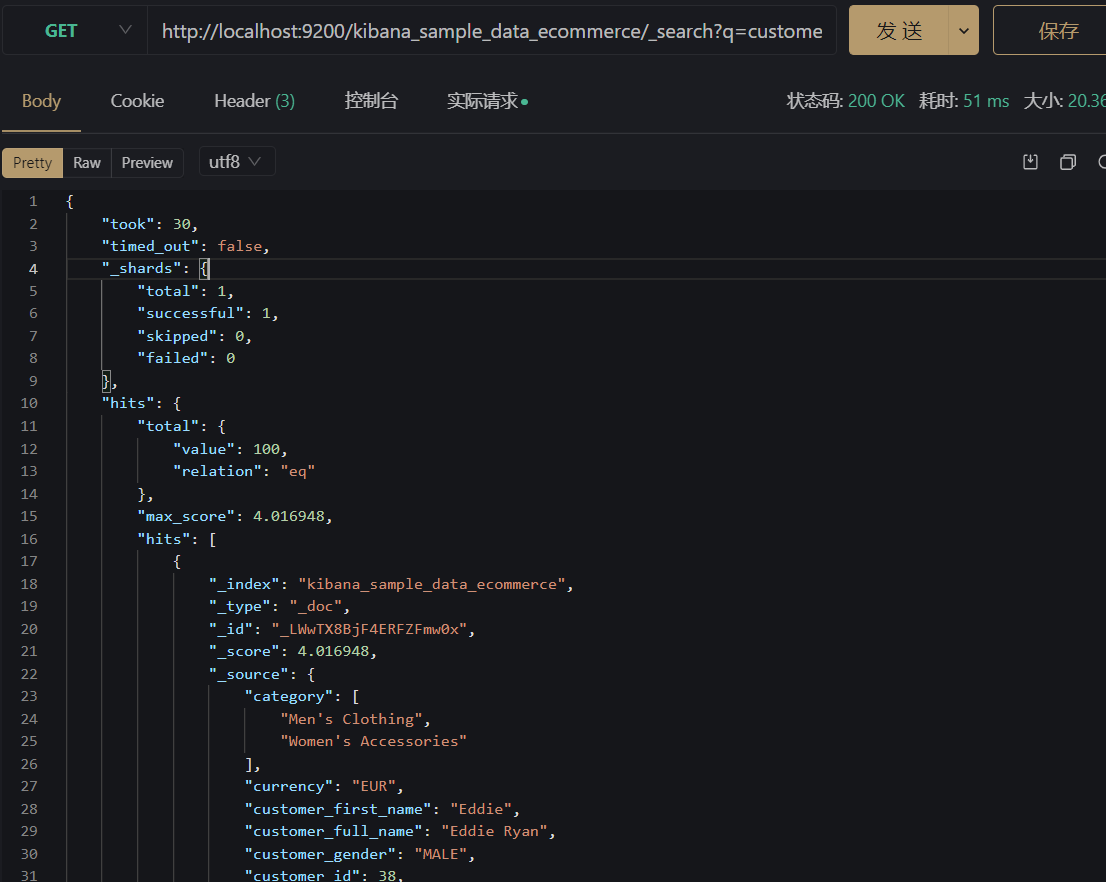
URL 查询
- 使用
q,指定查询字符串 query strig syntax,KV键值对
比如:
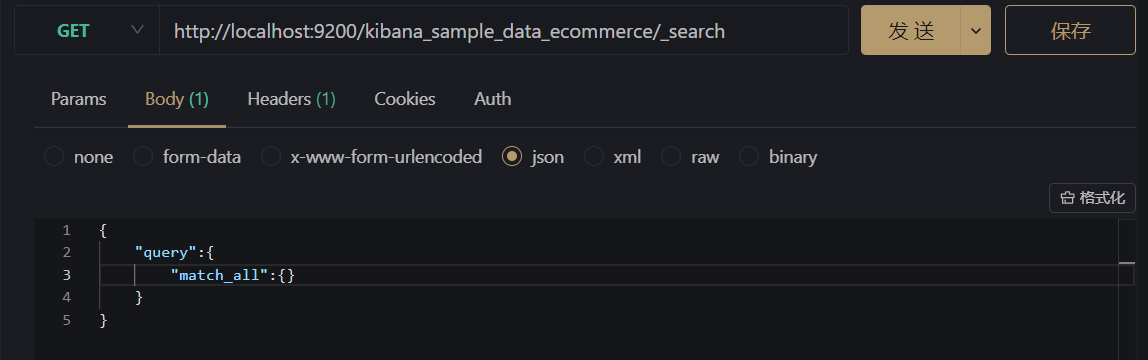
Request Body 查询
Bash
#支持POST和GET
#'match_all'指返回所有的文档
curl -XGET "http://localhost:9200/${index}/_search" -H 'Content-Type:application/json` -d '{"query:{"match_all":{}}}'
搜索相关性 Relevance
用户搜索关心的是搜索结果的相关性,如是否可用找到所有有关的内容、是否有不相关的内容、文档的打分是否合理、结果排名是否满足需求等。
如不同的搜索需求:
- Web 搜索
- 电商搜索

衡量相关性(Information Retrieval)主要有以下标准衡量:
- Precision:尽可能返回较少的无关文档
- Recall:尽量返回较多的相关文档
- Ranking:是否能够按照相关度进行排序
Precision 和 Recall 的计算类似机器学习中的模型评估
Precision = TP/TP+FP Recall = TP/TP+FN
URL Search
q指定查询语句,使用 Qeury String Syntaxdf默认字段,不指定时会对所有字段进行查询Sort排序from和size可用于分页profile可以查看查询是如何执行的
JSON
#基本查询
GET /movies/_search?q=2012&df=title&sort=year:desc&from=0&size=10&timeout=1s

#带profile
GET /movies/_search?q=2012&df=title
{
    "profile":"true"
}


#泛查询,正对_all,所有字段
GET /movies/_search?q=2012
{
    "profile":"true"
}

#指定字段
GET /movies/_search?q=title:2012&sort=year:desc&from=0&size=10&timeout=1s
{
    "profile":"true"
}
- 指定字段和泛查询
q=tiltle:2012q=2012- Term和Phrase
A B等效于 A OR B"A B"等效于 A AND B- 分组和引号
title:(A AND B)title="A B"
JSON
# 查找美丽心灵, Mind为泛查询
GET /movies/_search?q=title:Beautiful Mind
{
    "profile":"true"
}

# 泛查询
GET /movies/_search?q=title:2012
{
    "profile":"true"
}

#使用引号,Phrase查询
GET /movies/_search?q=title:"Beautiful Mind"
{
    "profile":"true"
}

#分组,Bool查询
GET /movies/_search?q=title:(Beautiful Mind)
{
    "profile":"true"
}
- 布尔操作
AND/OR/NOT或者&&/||/!- 必须大写
title:(matrix NOT reloaded)
- 分组
+表示must-表示must_not- `title:(+matrix -reloaded)
JSON
#布尔操作符
# 查找美丽心灵
GET /movies/_search?q=title:(Beautiful AND Mind)
{
    "profile":"true"
}

# 查找美丽心灵
GET /movies/_search?q=title:(Beautiful NOT Mind)
{
    "profile":"true"
}

# 查找美丽心灵
GET /movies/_search?q=title:(Beautiful %2BMind)
{
    "profile":"true"
}
- 范围查询
- 区间表示:
[]闭区间,{}开区间year:{2019 TO 2018}year:[* TO 2018]
- 算数符号
year:>2010year:(>2010 && <=2018>)year:(+>2010 +<=2018)
JSON
#范围查询 ,区间写法
GET /movies/_search?q=title:beautiful AND year:[2002 TO 2018]
{
    "profile":"true"
}

GET /movies/_search?q=title:year:>1980
{
    "profile":"true"
}
- 通配符查询(效率较低,占用内存大,不建议使用。特别是放在最前面)
?代表1个字符,*代表0或多个字符title:mi?dtitle:be*
- 正则表达式
title:[bt]oy- 模糊匹配与近似查询
title:beutiful~1title:"long rings"~2
JSON
#通配符查询
GET /movies/_search?q=title:b*
{
    "profile":"true"
}

//模糊匹配&近似度匹配
GET /movies/_search?q=title:beautifl~1
{
    "profile":"true"
}

GET /movies/_search?q=title:"Lord Rings"~2
{
    "profile":"true"
}
Request Body Search
- 将查询语句通过 HTTP Request Body 发送给 Elasticsesarch
- Query DSL
JSON
#ignore_unavailable=true,可以忽略尝试访问不存在的索引“404_idx”导致的报错
#查询movies分页
POST /movies,404_idx/_search?ignore_unavailable=true
{
  "profile": true,
  "query": {
        "match_all": {}
    }
}
- 分页
- From从0开始,默认返回10个结果
- 获取靠后的翻页成本较高
JSON
POST /kibana_sample_data_ecommerce/_search
{
  "from":10,
  "size":20,
  "query":{
    "match_all": {}
  }
}
- 排序
- 最好在“数字型”与“日期型”字段上排序
- 因为对于多值类型或分析过的字段排序,系统会选一个值,无法得知该值
JSON
#对日期排序
POST kibana_sample_data_ecommerce/_search
{
  "sort":[{"order_date":"desc"}],
  "query":{
    "match_all": {}
  }

}
- _source filtering
- 如果
_SOURCE没有存储,那就只返回匹配的文档的元数据 _source支持使用通配符- `_souce["name,"desc"]
JSON
#source filtering
POST kibana_sample_data_ecommerce/_search
{
  "_source":["order_date"],
  "query":{
    "match_all": {}
  }
}
- 脚本字段
- 能通过表达式返回所需字段
JSON
#脚本字段
GET kibana_sample_data_ecommerce/_search
{
  "script_fields": {
    "new_field": {
      "script": {
        "lang": "painless",
        "source": "doc['order_date'].value+'hello'"
      }
    }
  },
  "query": {
    "match_all": {}
  }
}
- 使用查询表达式-Match
JSON
POST movies/_search
{
  "query": {
    "match": {
      "title": "last christmas" #默认OR
    }
  }
}

POST movies/_search
{
  "query": {
    "match": {
      "title": {
        "query": "last christmas",
        "operator": "and"
      }
    }
  }
}
- 短语搜索-Match Phrase
JSON
POST movies/_search
{
  "query": {
    "match_phrase": {
      "title":{
        "query": "one love" #默认AND

      }
    }
  }
}

POST movies/_search
{
  "query": {
    "match_phrase": {
      "title":{
        "query": "one love",
        "slop": 1 #指定数量的Term
      }
    }
  }
}
Query String Query
- 类似URL Query
JSON
POST users/_search
{
  "query": {
    "query_string": {
      "default_field": "name",
      "query": "Ruan AND Yiming" # 与操作
    }
  }
}


POST users/_search
{
  "query": {
    "query_string": {
      "fields":["name","about"],
      "query": "(Ruan AND Yiming) OR (Java AND Elasticsearch)"
    }
  }
}


# 多fields
GET /movies/_search
{
    "profile": true,
    "query":{
        "query_string":{
            "fields":[
                "title",
                "year"
            ],
            "query": "2012"
        }
    }
}
Simple Query String Query
- 类似 Query String,但是会忽略错误的语法,同时只支持部分查询语法
- 不支持 AND OR NOT,会当作字符串处理
- Term 之间默认的关系是 OR,可以指定 Operator
- 支持部分逻辑
+替代AND-替代OR-替代NOT
JSON
#Simple Query 默认的operator是 Or
POST users/_search
{
  "query": {
    "simple_query_string": {
      "query": "Ruan AND Yiming",
      "fields": ["name"]
    }
  }
}


POST users/_search
{
  "query": {
    "simple_query_string": {
      "query": "Ruan Yiming",
      "fields": ["name"],
      "default_operator": "AND"
    }
  }
}

GET /movies/_search
{
    "profile":true,
    "query":{
        "simple_query_string":{
            "query":"Beautiful +mind",
            "fields":["title"]
        }
    }
}
参考
https://time.geekbang.org/course/intro/100030501?tab=catalog